
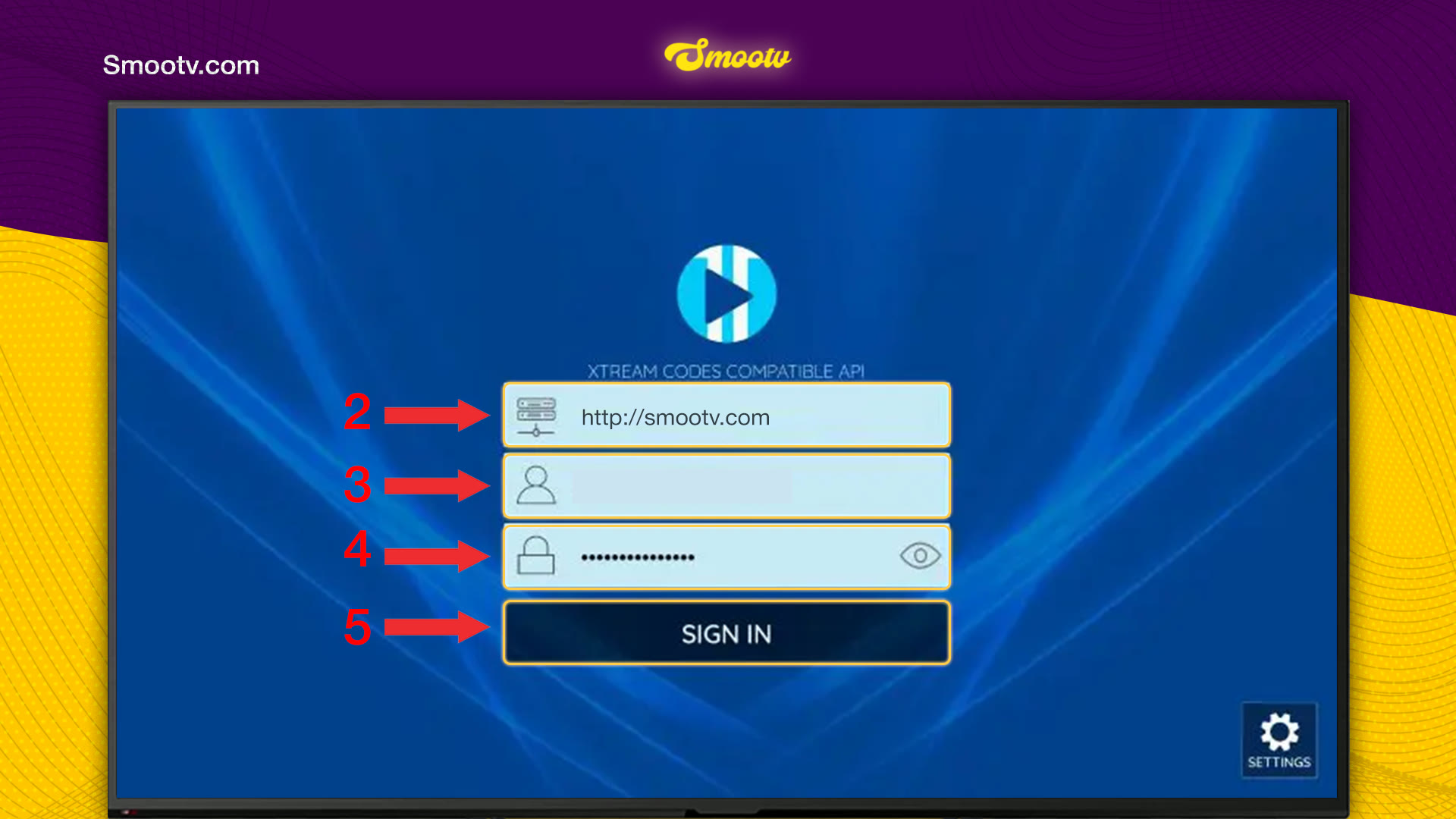
Open XCIPTV and choose Xtream Codes API on the Select Panel Type screen. Enter the server URL, username and password that Smootv sent you and press Sign In. The app then updates Live TV, VOD, Series and the guide one after the other. When all four are done, the home screen opens with Live TV, TV Guide, Movies and Series.
What You Need
- The XCIPTV app installed on your Smart TV or device
- Your Smootv login details: server URL, username and password (they are in the message we sent you with your trial or subscription)
- A working internet connection on that device
Good to know
XCIPTV is only a player and has no channels of its own. It shows what your Smootv account contains, so it stays empty until you sign in.
Step 1: Choose Xtream Codes API
Open XCIPTV. On the Select Panel Type screen, choose Xtream Codes API, the first option in the list. If the app is already in use, go to Account and Add Playlist first to reach this screen.

Step 2: Enter Your Smootv Details and Sign In
- First field: the server URL from our message, starting with http://.
- Second field: the username we sent you.
- Third field: the password we sent you. Select the eye icon to see what you typed.
- Press Sign In.
No playlist yet?
Ask us for a free 24-hour trial and we will send you one. Request your free trial
Step 3: Let the App Load Your Content
After signing in you see Update Media Contents with four columns: Live TV, VOD, Series and Guide. Each one goes from Waiting to Updating to Completed. Do not press anything while it says Please wait.

Step 4: Start Watching
The home screen has four large tiles: Live TV, TV Guide, Movies and Series. Along the bottom you find Account, Multi, Catch Up, Favorite, Radio and Settings.

That is all. Pick Live TV, Movies or Series and start watching.
If Something Does Not Work
Sign In does not work
Select the eye icon and read your password back. Check capital letters in the username and password, and make sure the server URL starts with http:// and has no space at the end. If it still fails, message us and we will check your account.
The update screen seems stuck
The first load takes the longest because the app fetches every channel, film, series and the full guide. Give it a few minutes. If one column never reaches Completed, close the app, check your internet connection and open it again.
Channels or the guide look out of date
Select the Update icon in the top right corner of the home screen. The app then loads your content again.
The picture buffers or freezes
Use a network cable or 5 GHz Wi-Fi. You need about 25 Mbps for HD and 50 Mbps for 4K. Restarting your router and the app often helps as well.
XCIPTV Questions
Which panel type do I choose in XCIPTV?
Xtream Codes API. That is the login type that matches the server URL, username and password you get from Smootv.
Does XCIPTV come with channels?
No. It is a player. Channels, films and series come from the Smootv account you sign in with.
Why does the app update four things after I sign in?
XCIPTV loads live channels, films (VOD), series and the TV guide separately. It loads them one after the other, which is why you see four columns.
How do I add a second playlist?
Go to Account on the home screen and choose Add Playlist. You then get the Select Panel Type screen again and follow the same steps.
Is there a TV guide in XCIPTV?
Yes. TV Guide is one of the four large tiles on the home screen, and the app loads the guide data during the first update.
Still Stuck?
Message us on WhatsApp or Telegram and we will set it up with you, step by step.


