
Open TiviMate and press Add playlist. Choose Xtream Codes, enter the server address, username and password that Smootv sent you, and press Next. When the app says Playlist is processed, press Done. TiviMate then loads your channels and the TV guide.
What You Need
- The TiviMate app installed on your Android TV device or Fire TV Stick
- Your Smootv login details: server address, username and password (they are in the message we sent you with your trial or subscription)
- Your remote control and a few minutes
Good to know
TiviMate tells you this itself on the first screen: the app does not provide any TV channels. It only plays the playlist you add, which here is your Smootv account.
Step 1: Press Add Playlist
Open TiviMate. A fresh install shows a short notice with two buttons below it. Press Add playlist.

Step 2: Choose Xtream Codes
On the Playlist type screen you see three options: M3U playlist, Xtream Codes and Stalker Portal. Select Xtream Codes.

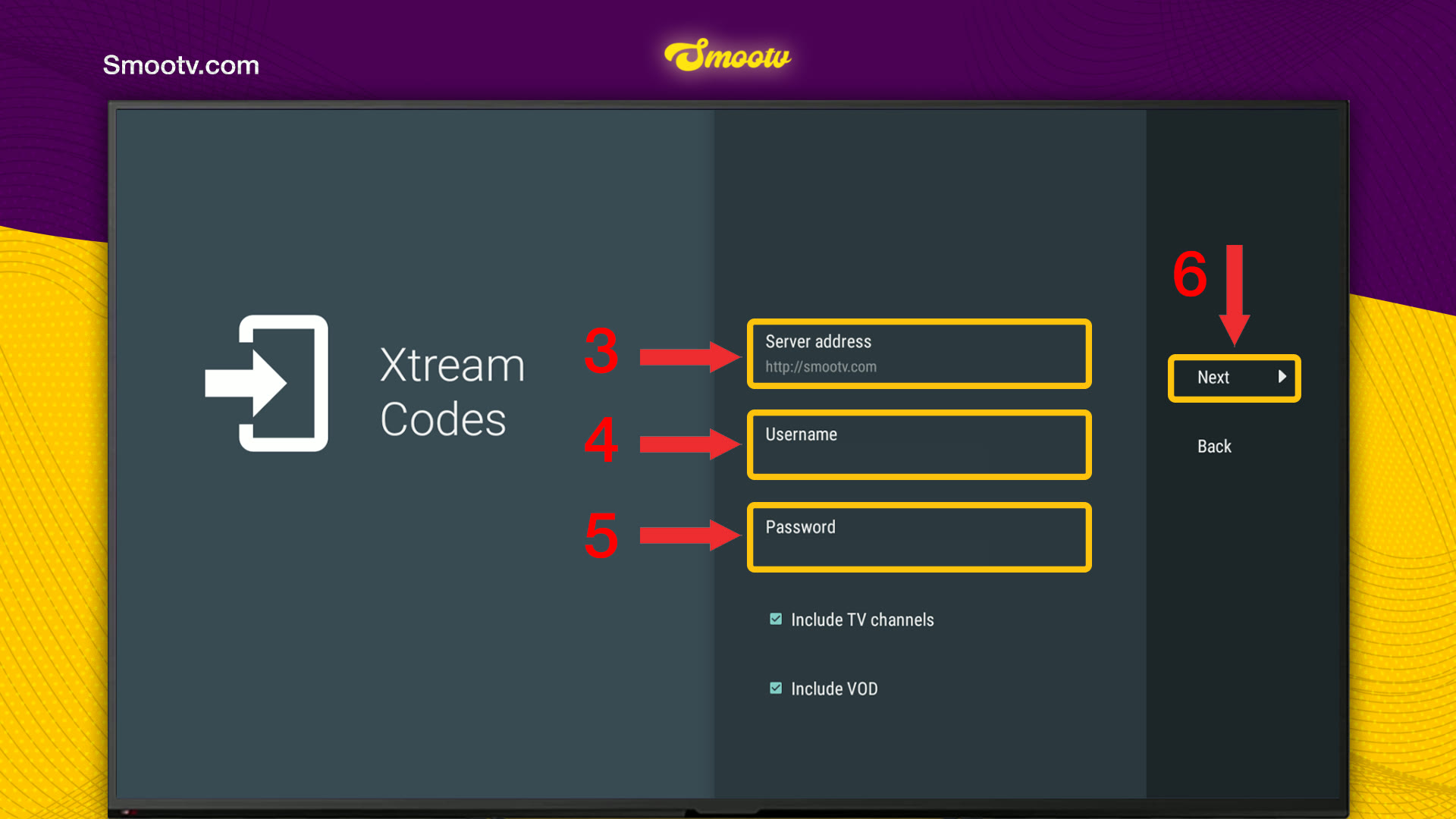
Step 3: Enter Your Smootv Details
- Server address: the URL from our message, starting with http://. If we gave you a port, type it as well.
- Username: the username we gave you.
- Password: the password we gave you.
- Leave Include TV channels and Include VOD ticked, then press Next.
Typing with a remote is slow, so take your time. One wrong letter or a capital in the wrong place is enough for the login to fail.
No playlist yet?
Ask us for a free 24-hour trial and we will send you one. Request your free trial
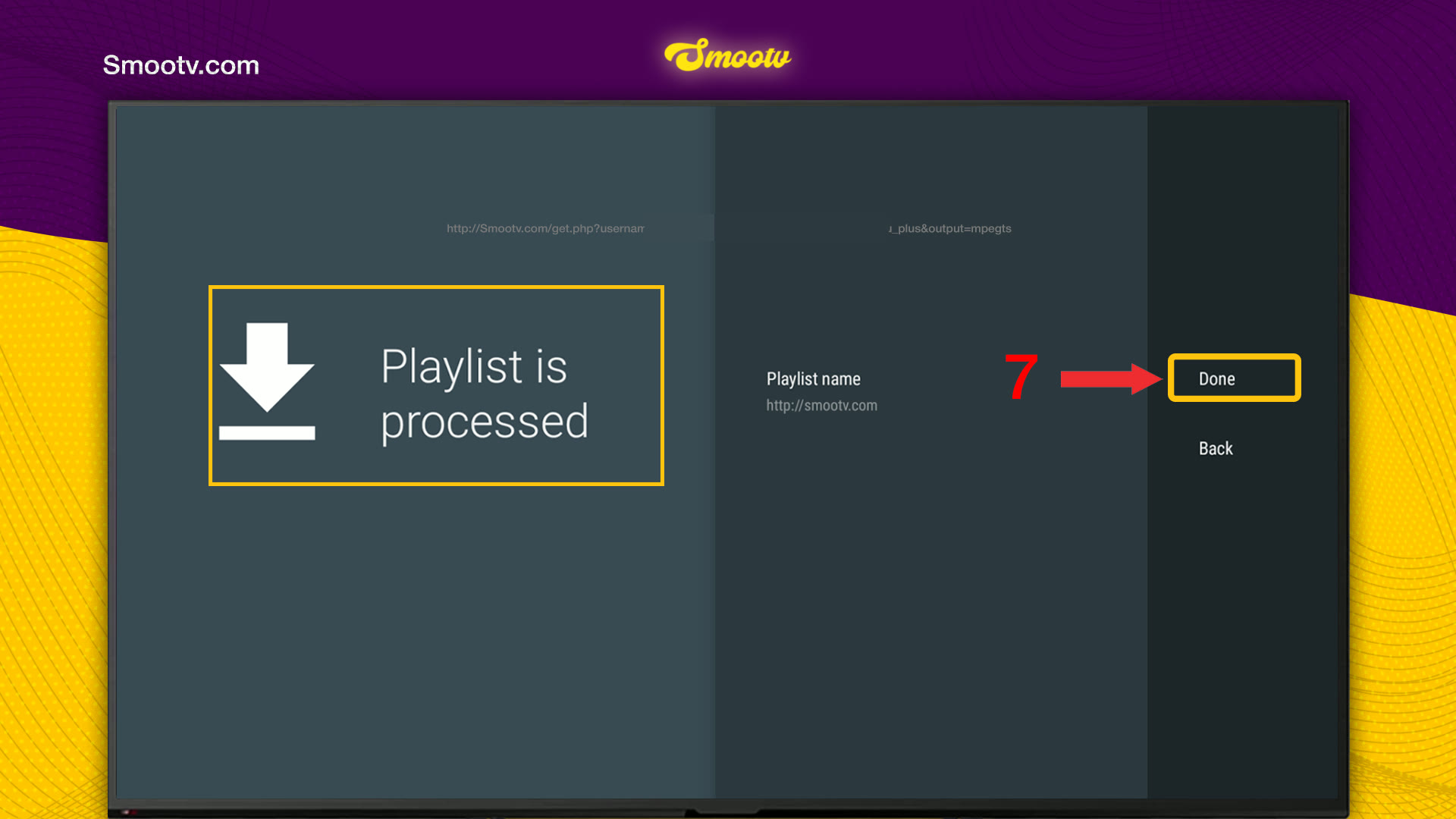
Step 4: Press Done and Start Watching
TiviMate checks your details and then shows Playlist is processed. You can change the playlist name here if you like. Press Done, and the app adds the playlist and loads your channels and the TV guide.
If you have more than one playlist in TiviMate, open the Playlists panel and make sure the Smootv one is ticked. The same panel has Add playlist and Update all playlists.
The main screen lists your channel groups on the left and the programme guide on the right. Pick a group, pick a channel and press OK.

That is all. Your playlist is saved in TiviMate, so you do not have to enter it again.
If Something Does Not Work
TiviMate does not accept the login
Go back and check the three fields. The server address must start with http:// and include the port if we gave you one, and the username and password are case-sensitive. If it still fails, message us and we will check your account.
You see channels from the wrong playlist
Open the Playlists panel and tick the Smootv playlist. TiviMate shows the channel count under each playlist, which makes it easy to tell them apart.
Channels or the TV guide look out of date
Open the Playlists panel and choose Update all playlists. TiviMate then reloads the channel list.
The picture buffers or freezes
Use a network cable or 5 GHz Wi-Fi. You need about 25 Mbps for HD and 50 Mbps for 4K. Restarting your router and the app often helps as well.
TiviMate Questions
Does TiviMate come with channels?
No. The app says so on its first screen: it does not provide any sources of TV channels. You add the playlist of your provider, which here is Smootv.
Xtream Codes or M3U playlist: which one should I pick?
Xtream Codes. You type three short details instead of one very long link, which is a lot easier with a remote control.
What do the Include TV channels and Include VOD boxes do?
They decide what TiviMate loads from your account: live channels, films and series on demand, or both. Leave both ticked to get everything.
Can I rename the playlist?
Yes. The Playlist is processed screen has a Playlist name field. By default it shows the server address, and you can replace it with Smootv or any name you like.
Do I have to add the playlist again when I renew Smootv?
No, as long as your login details stay the same. If we send you new details, add them as a new playlist with the same steps.
Still Stuck?
Message us on WhatsApp or Telegram and we will set it up with you, step by step.


