
Open Televizo and press Create playlist, then choose New Xtream Codes playlist. Fill in the four fields from top to bottom: a name for the list, your Smootv username, your password and the server address. Tap the check mark in the top right corner to save. After a few seconds the Channels, Movies and Series tabs fill with your Smootv content. Everything happens inside the app, so you do not need a website or a second device.
What You Need
- The Televizo app installed on your TV or device
- Your Smootv username, password and server address (they are in the message we sent you with your trial or subscription)
- A working internet connection on that device
Good to know
Televizo is a video player only. The app says so on its first screen: it does not provide any content, and you must add your own playlist to watch anything. Its makers are a separate company from Smootv.
Step 1: Open Televizo and Press Create Playlist
Open Televizo. As long as no playlist has been added, the first screen shows two buttons at the bottom: Create playlist and Settings. Press Create playlist.

Step 2: Choose New Xtream Codes Playlist
A small window offers two options: New M3U playlist and New Xtream Codes playlist. Choose New Xtream Codes playlist. It asks for three short details instead of one long link, which is much easier to type with a remote control.

Step 3: Enter Your Smootv Details and Save
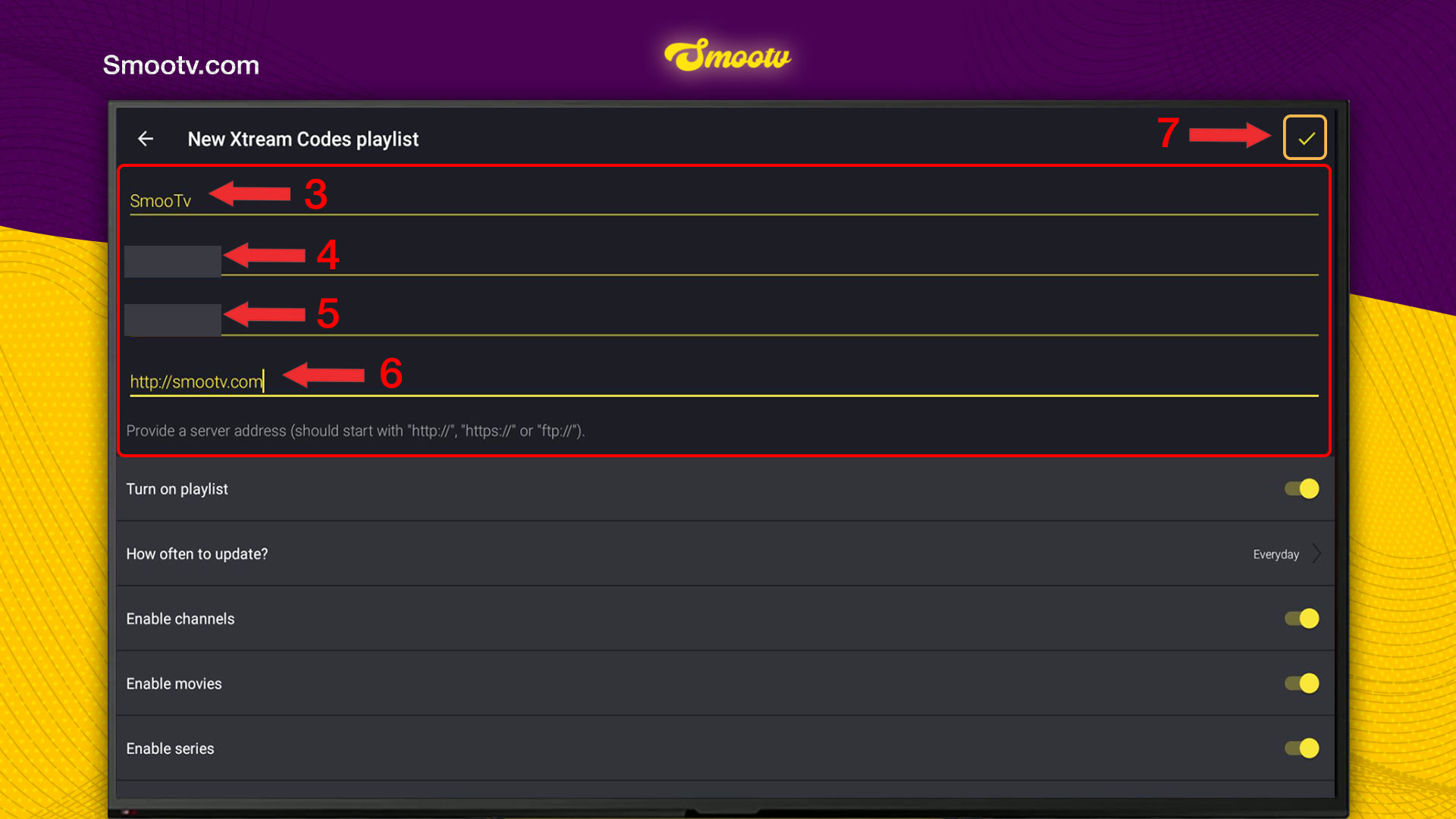
The screen New Xtream Codes playlist has four fields, one below the other. Fill them in from top to bottom:
- First field: a name for the playlist. Anything works, for example Smootv.
- Second field: your Smootv username.
- Third field: your Smootv password.
- Fourth field: the server address we sent you. The app notes that it should start with http://, https:// or ftp://.
- Tap the check mark in the top right corner to save.
Type the username and password exactly as we sent them, capital letters included, and watch out for the letter O and the number 0.
Check the switches below the fields
Under the four fields you see Turn on playlist, How often to update?, Enable channels, Enable movies and Enable series. In our screenshot they are all switched on and the update is set to Everyday. That is what we used for this guide, so set yours the same way before you save.
No playlist yet?
Ask us for a free 24-hour trial and we will send you one. Request your free trial
Step 4: Wait for the Playlist to Load
Give the app a few seconds. When the playlist is ready, the main screen opens with three tabs at the top: Channels, Movies and Series. Under Channels you find All channels, Recently watched and Favorites, followed by the categories of your Smootv subscription.
That is all. Your details stay saved in the app, so you only do this once.
If Something Does Not Work
The playlist does not load after saving
Nine times out of ten it is a typing mistake. Check the username and password letter by letter, including capitals, and make sure there is no space before or after them.
The app does not accept the server address
Type it exactly as we sent it, starting with http:// or https://. The app states that the address should start that way, so add it if it is missing.
Channels appear but Movies or Series stay empty
Enable movies and Enable series are two switches on the same screen as your login details. If one of them was off when you saved, that section stays empty. Message us and we will help you switch it back on.
The picture buffers or freezes
Use a network cable or 5 GHz Wi-Fi. You need about 25 Mbps for HD and 50 Mbps for 4K. Restarting your router and the app often helps as well.
Televizo Questions
Where do I get the username, password and server address for Televizo?
From Smootv, not from Televizo. They are in the message we sent you when your trial or subscription started. Televizo itself does not hand out accounts.
Does Televizo come with channels?
No. The app states that it is a video player only and does not provide any content. Channels, films and series come from your Smootv playlist.
Can I use an M3U link instead of Xtream Codes?
Yes. In step 2, choose New M3U playlist instead. Both ways load the same Smootv content. We recommend Xtream Codes because three short details are easier to type on a TV than one long link.
Do I need a website or a second device to set up Televizo?
No. Unlike players that work with a MAC address and an upload page, Televizo lets you enter everything in the app itself.
Do I have to enter my details again when I renew Smootv?
No, as long as your username, password and server address stay the same. If we send you new details, add them as a new playlist by following the same steps.
Still Stuck?
Message us on WhatsApp or Telegram and we will set it up with you, step by step.


