
Open IPTV Smarters Pro and choose Xtreme Codes on the Choose Playlist Type screen. Give the playlist a name, enter the username, password and URL that Smootv sent you, and press Add User. After a few seconds the home screen opens with Live TV, Movies and Series.
What You Need
- The IPTV Smarters Pro app installed on your device
- Your Smootv login details: username, password and URL (they are in the message we sent you with your trial or subscription)
- A working internet connection on that device
Good to know
IPTV Smarters Pro is only a player and comes without channels. Everything you watch in it comes from your Smootv account, so the app has nothing to show until you log in.
Step 1: Open the App and Choose Xtreme Codes
Start IPTV Smarters Pro. The app asks which type of playlist you want to add and shows six tiles. Pick Xtreme Codes, the middle tile in the top row.
Logging in this way is quicker than loading an M3U file, because you only type three short details.

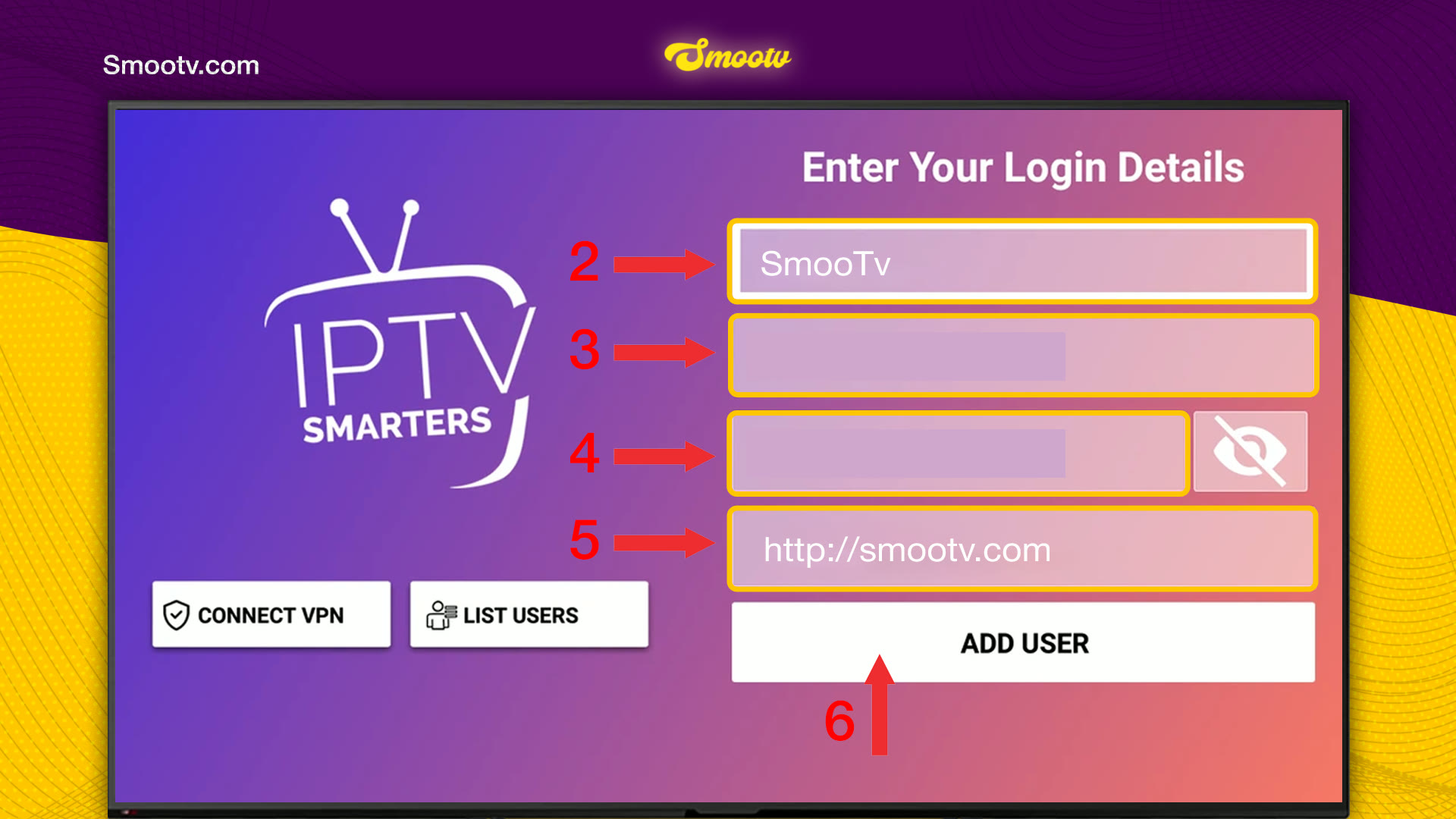
Step 2: Enter Your Smootv Login Details
The Enter Your Login Details screen has four fields. Fill them in from top to bottom:
- Playlist name: anything you like, for example Smootv.
- Username: the username of your Smootv subscription.
- Password: the password of your Smootv subscription.
- URL: the server address from our message, starting with http://.
- Press Add User.
Usernames and passwords are case-sensitive. Tap the eye icon next to the password field to check what you typed.
No playlist yet?
Ask us for a free 24-hour trial and we will send you one. Request your free trial
Step 3: Wait for the Playlist to Load
The app needs a few seconds to load your channels. When it is done, the home screen opens with three large tiles: Live TV, Movies and Series. Below them you find Install EPG for the TV guide, Multi-Screen and Catch Up.
The bottom left corner shows the expiration date of your subscription, so you can always see how long it still runs.

That is all. Pick Live TV, Movies or Series and start watching.
If Something Does Not Work
The app shows an error after Add User
Nearly always one of the three details is mistyped. Check capital letters in the username and password, and make sure the URL starts with http:// and has no space at the end. If it still fails, send us a message and we will check your account.
Live TV, Movies or Series stays empty
Give the first load a full minute, because the app downloads the whole channel list. If a section is still empty, close the app completely and open it again.
The TV guide is empty
Press Install EPG on the home screen. The app then loads the programme information for your channels.
The picture buffers or freezes
Use a network cable or 5 GHz Wi-Fi. You need about 25 Mbps for HD and 50 Mbps for 4K. Restarting your router and the app often helps as well.
IPTV Smarters Pro Questions
Which option do I choose: Xtreme Codes or a playlist file?
Xtreme Codes. You only enter a username, a password and a URL, and the app loads live channels, films and series in separate sections.
Does IPTV Smarters Pro include channels?
No. It is a player. Channels, films and series come from the Smootv account you log in with.
What do I type in the playlist name field?
Whatever helps you recognise it. The name is only a label inside the app and has no effect on the login.
Where do I see when my subscription ends?
On the home screen, in the bottom left corner, next to Expiration.
What is the List Users button for?
It shows the accounts that are already saved in the app, so you can switch between them without typing the details again.
Still Stuck?
Message us on WhatsApp or Telegram and we will set it up with you, step by step.


