
Open Purple IPTV, press Login and then Skip. On the All Playlist screen, press Add Playlist and choose Login With Xstream. Fill in a playlist name, your Smootv username, your password and the server address, then press Login. Select the new playlist in the list, and the main menu opens with LIVE TV, MOVIES and SERIES filled with your Smootv content. Everything happens inside the app, so you do not need a website or a second device.
What You Need
- The Purple IPTV app (also known as Smart Purple) installed on your TV or device
- Your Smootv username, password and server address (they are in the message we sent you with your trial or subscription)
- A working internet connection on that device
Good to know
Purple IPTV is only a media player. The app says so itself: it does not sell playlists or subscriptions, and it does not include any content or playlist. Its makers are a separate company from Smootv.
Step 1: Open Purple IPTV, Press Login, Then Skip
Open Purple IPTV. The first screen shows a row of tiles. Press Login, the first one on the left.

The next screen offers several sign-in methods, such as Activate Device and Mac ID. You do not need any of them for the route in this guide. Press Skip, the button below the tiles.

Step 2: Press Add Playlist and Choose Login With Xstream
You are now on the All Playlist screen, which is still empty. Press the large plus sign labelled Add Playlist.

Three options appear. Choose the middle one, Login With Xstream. The label is cut off on the tile, and the app spells Xtream with an s. It asks for three short details instead of one long link, which is much easier to type with a remote control.

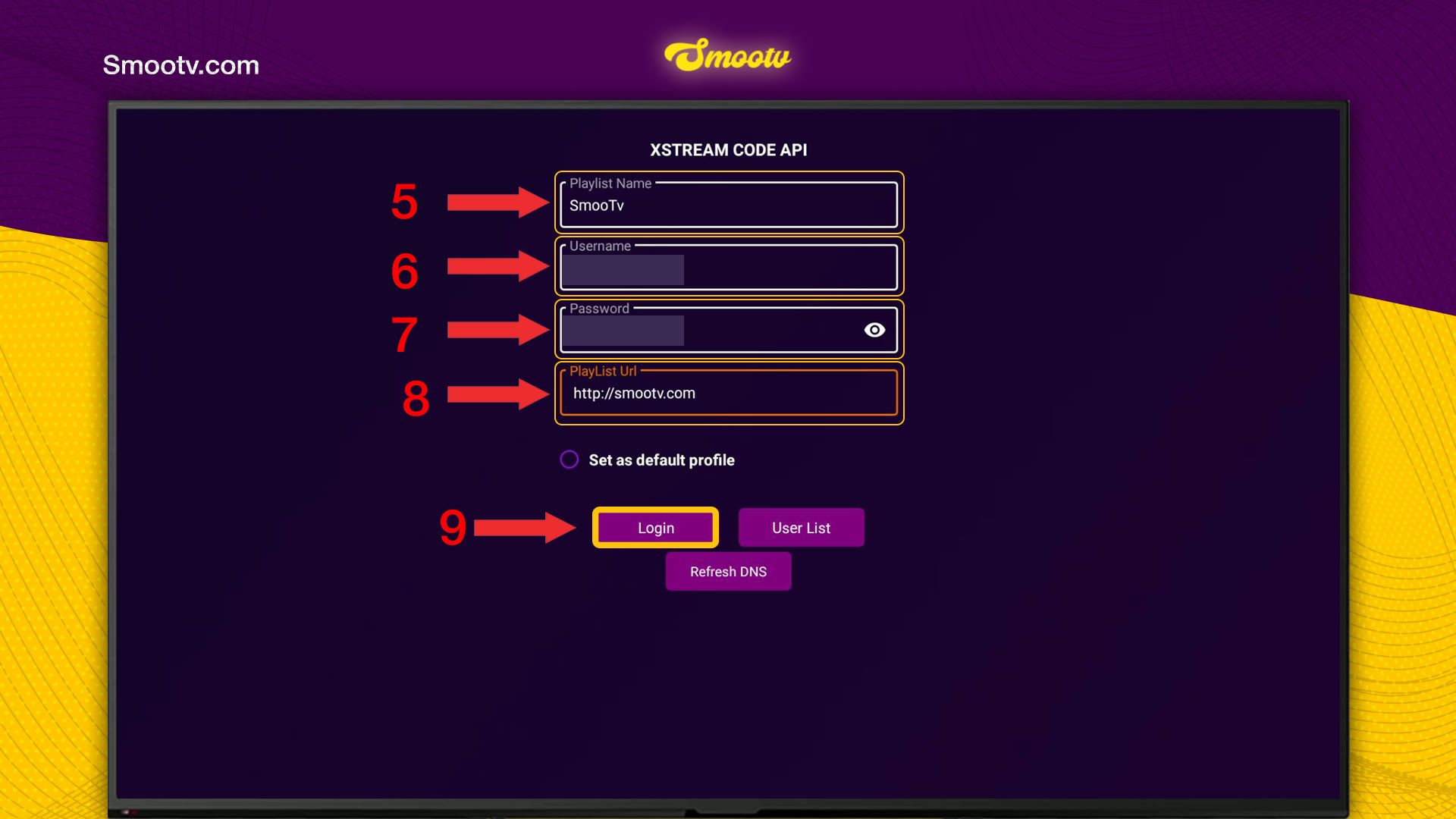
Step 3: Enter Your Smootv Details and Press Login
The form is titled XSTREAM CODE API and has four fields:
- Playlist Name: a name for the list. Anything works, for example Smootv.
- Username: your Smootv username.
- Password: your Smootv password. The eye icon on the right shows what you typed, so you can check it.
- PlayList Url: the server address we sent you, starting with http://.
- Press Login. If you like, tick Set as default profile first.
Type the username and password exactly as we sent them, capital letters included, and watch out for the letter O and the number 0.
No playlist yet?
Ask us for a free 24-hour trial and we will send you one. Request your free trial
Step 4: Select Your Playlist and Start Watching
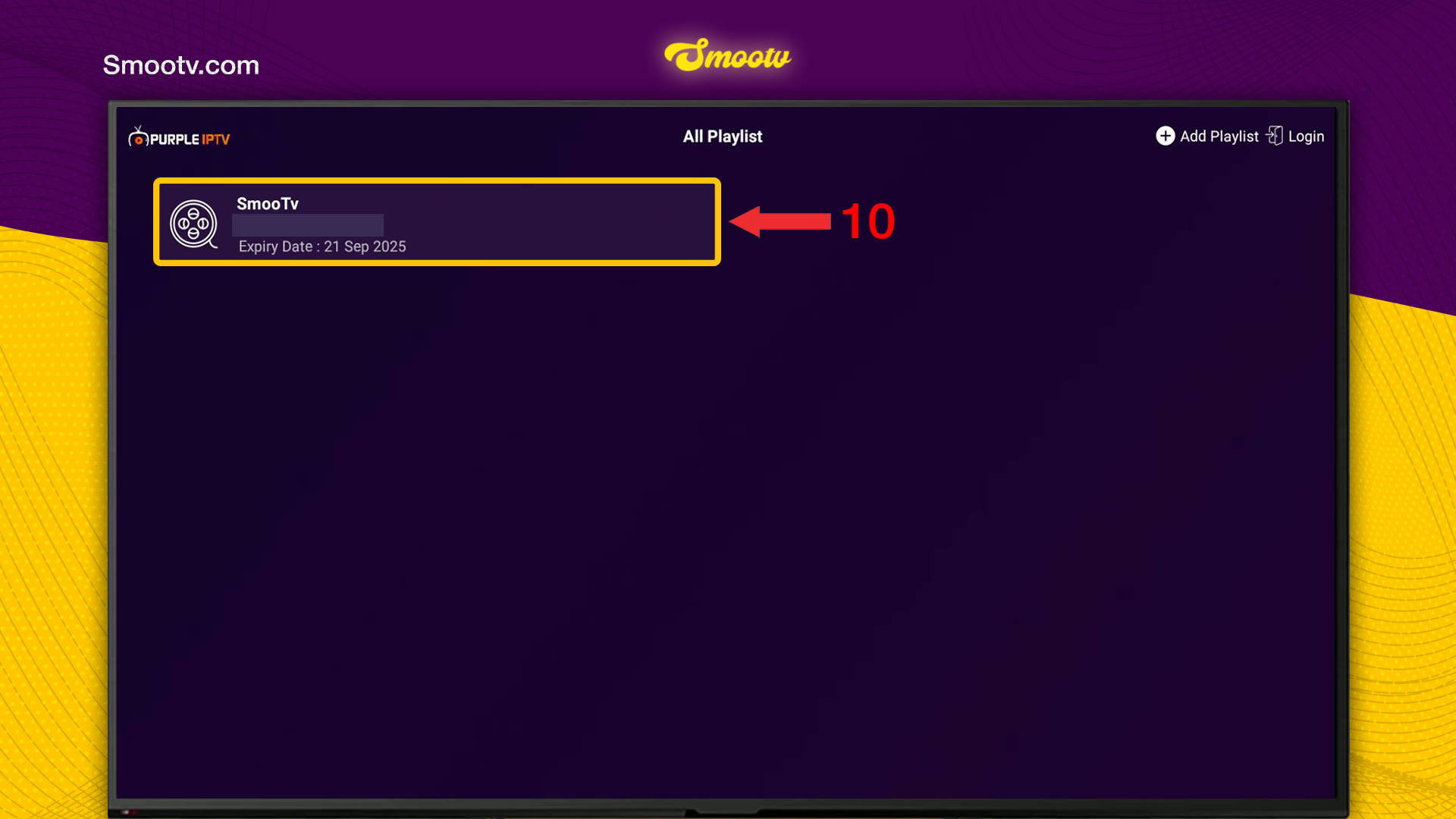
The app returns to All Playlist, where your list now appears under the name you gave it, together with its expiry date. Select it. If you ever add more than one list, make sure you pick the right one here.
Give the app a few seconds while the playlist loads. The main menu then opens with LIVE TV, TV GUIDE, MOVIES and SERIES in the top row, and SEARCH, FAVOURITES, RECENTS and SETTINGS around them. The bar at the bottom shows the playlist name and its Expire On date.

That is all. Your details stay saved in the app, so you only do this once.
If Something Does Not Work
Login fails or the playlist does not load
Nine times out of ten it is a typing mistake. Use the eye icon to show the password, then check username and password letter by letter, capital letters included, and make sure there is no space before or after them.
I am not sure what to enter in PlayList Url
Enter the server address from our message, starting with http://, and nothing after it. Do not paste the long M3U link here: this form only wants the address of the server.
I pressed one of the sign-in tiles instead of Skip
Go back one screen and press Skip. This guide does not use any of the sign-in tiles on that screen.
The picture buffers or freezes
Use a network cable or 5 GHz Wi-Fi. You need about 25 Mbps for HD and 50 Mbps for 4K. Restarting your router and the app often helps as well.
Purple IPTV Questions
Are Purple IPTV and Smart Purple the same app?
This guide covers the app that shows the name PURPLE IPTV on its screens and calls itself Purple Player in its notices. People also search for it as Smart Purple. If your screens match the screenshots here, you are in the right place.
Where do I get the username, password and server address?
From Smootv, not from Purple IPTV. They are in the message we sent you when your trial or subscription started. The app states that it does not sell playlists or subscriptions.
Do I need a Purple account or a device activation?
Not for the route in this guide. We pressed Skip on the sign-in screen and added the Smootv playlist directly, without using Activate Device or any other sign-in tile.
Can I use an M3U link instead of Xtream Codes?
In step 2 the app also shows an option whose label starts with Load Playlist From. This guide does not cover it. We use the Xtream route because three short details are easier to type on a TV than one long link.
What does the expiry date in the app mean?
The app shows it next to your playlist on the All Playlist screen, and again as Expire On at the bottom of the main menu. When you renew Smootv and your details stay the same, you do not have to enter them again.
Still Stuck?
Message us on WhatsApp or Telegram and we will set it up with you, step by step.


