
Open IBO Player Pro and select the account icon at the top of the home screen. Write down the Mac Address and the Device Key. On your phone or computer, log in with those two codes on the IBO Player Pro website, press Add Playlist, give the playlist a name, paste your Smootv M3U link and press Submit. Back in the app, press the reload icon or restart it, and your channels, films and series load.
Activate IBO Player Pro through Smootv
IBO Player Pro is free for 7 days. After that the app needs a one-time activation per device; we arrange it for you for €13, valid for the lifetime of your device, and with a 12-month subscription the activation is free. No website, no file upload: send us the code the app shows and we do the rest.
What You Need
- The IBO Player Pro app installed on your TV or device
- Your Smootv M3U link (it is in the message we sent you with your trial or subscription)
- A phone or computer to open the IBO Player Pro website
Good to know
IBO Player Pro is only a player. It comes without channels, and its makers are a separate company from Smootv. The app starts on a free trial; once that ends, its makers ask you to activate it on their website. That payment is separate from your Smootv subscription.
Step 1: Find Your Mac Address and Device Key
Open IBO Player Pro on your TV. On the home screen, select the account icon in the top right corner. You can reach the same window through Settings, under Account Info.

The Account window lists your Mac Address and your Device Key. Write both down or take a photo. The same window shows whether the app is still on its free trial and when that trial expires.

Step 2: Log In on the IBO Player Pro Website
On your phone or computer, open the playlist page of IBO Player Pro: iboproapp.com/manage-playlists
- Type your Mac Address in the first field, exactly as the app shows it.
- Type your Device Key in the second field.
- Press Login.

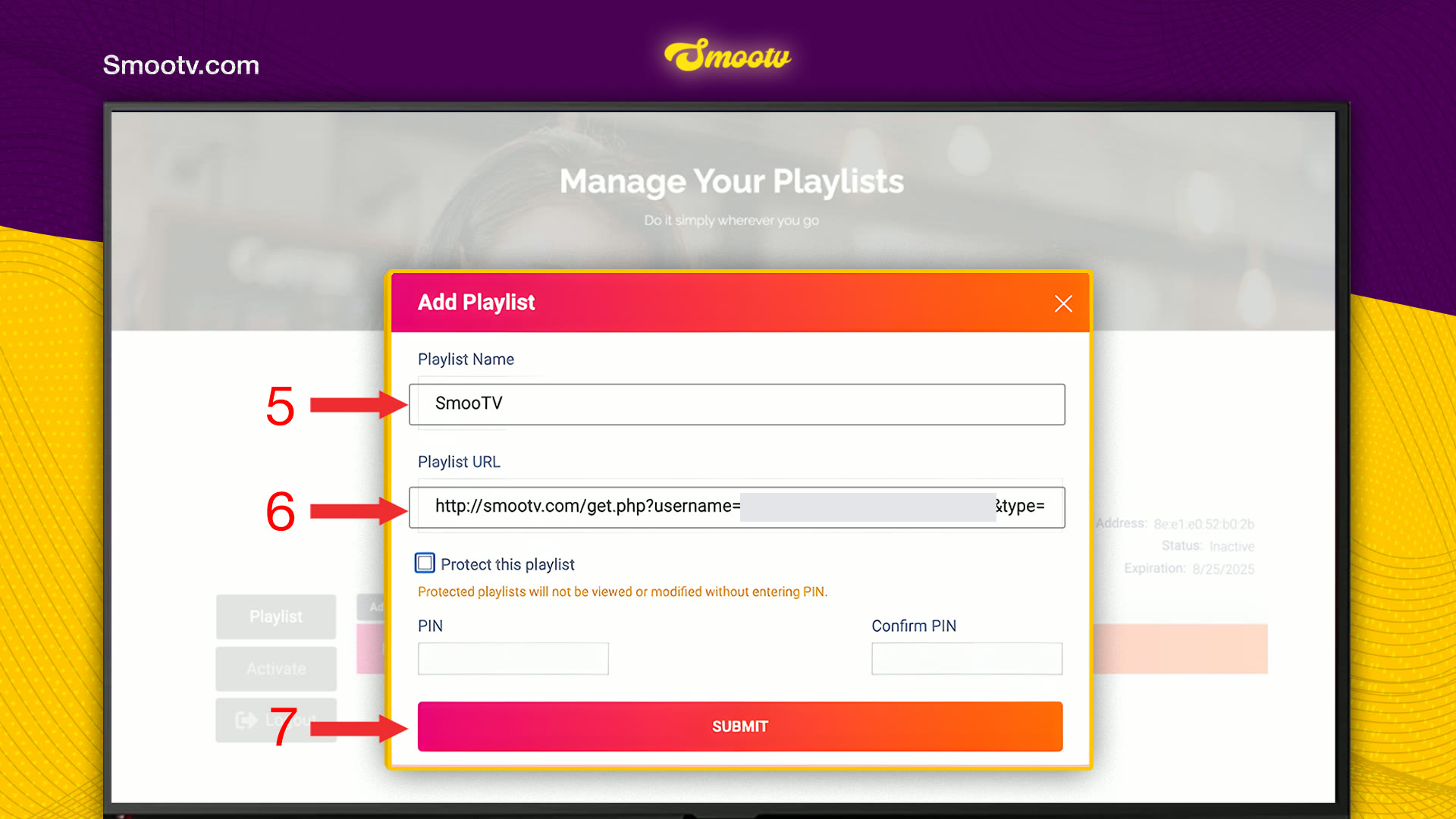
Step 3: Add Your Smootv Playlist
After logging in you land on Your playlists, with your Mac Address shown on the right. Press Add Playlist.

- In Playlist Name, type any name you like, for example Smootv.
- In Playlist URL, paste your Smootv M3U link.
- Press Submit.
You can leave Protect this playlist unticked. If you tick it and set a PIN, nobody can view or change the playlist without that PIN, so keep it somewhere safe.
No playlist yet?
Ask us for a free 24-hour trial and we will send you one. Request your free trial
Step 4: Reload the App and Start Watching
Go back to your TV and press the reload icon at the top of the home screen, next to the account icon. Restarting the app works too. Wait a few seconds while the playlist loads. After that, Live, Movies and Series are filled with your Smootv content.
That is all. The playlist stays linked to this device, so you only do this once.
If Something Does Not Work
The website does not accept your login
Check the Mac Address character for character, including the colons, and type the Device Key exactly as the Account window shows it. The letter O and the number 0 are easy to mix up.
The app still shows the demo content
Press the reload icon or restart the app. If nothing changes, log in on the website again and check that the playlist is listed and that the M3U link was pasted in full.
The free trial of the app has ended
Log in on the IBO Player Pro website and open Activate. The activation is sold by the makers of the app, so questions about payment go to their support. Your Smootv playlist stays in place.
The picture buffers or freezes
Use a network cable or 5 GHz Wi-Fi. You need about 25 Mbps for HD and 50 Mbps for 4K. Restarting your router and the app often helps as well.
IBO Player Pro Questions
Is IBO Player Pro free?
The app starts on a free trial. The Account window shows the account state and the date the trial expires. After that date the makers of the app ask for a paid activation on their website.
Where do I find the Device Key?
In the Account window of the app. Open it with the account icon at the top of the home screen, or go to Settings and choose Account Info. The Device Key is on the line under the Mac Address.
Does the app come with channels?
No. A new installation only shows demo content. Channels, films and series come from your Smootv playlist.
What is the PIN in the Add Playlist window for?
It belongs to the option Protect this playlist. A protected playlist cannot be viewed or changed without the PIN. It is optional, and the playlist works the same without it.
Can I use my Xtream Codes login instead of an M3U link?
Yes. Next to Add Playlist there is an Add XC Playlist button for Xtream Codes details. Both ways load the same Smootv content, so use the one you find easier.
I have two devices. Do I add the playlist twice?
Yes. Every device has its own Mac Address and Device Key, so you log in and add the playlist once per device.
Still Stuck?
Message us on WhatsApp or Telegram and we will set it up with you, step by step.


