
Open VLC, click Media and choose Open Network Stream, or press Ctrl + N. Paste your Smootv M3U link in the network URL field and click Play. Then open View and choose Playlist, or press Ctrl + L, to see all your channels. Double-click a channel to watch it.
What You Need
- VLC media player installed on your computer
- Your Smootv M3U link (it is in the message we sent you with your trial or subscription)
- A working internet connection
Good to know
The screenshots in this guide show VLC on Windows with the menus in English. If your VLC runs in another language, the menus are in the same place and the keyboard shortcuts are the same.
Step 1: Open Network Stream
Start VLC and click Media in the menu bar. Choose Open Network Stream. The shortcut Ctrl + N opens the same window.

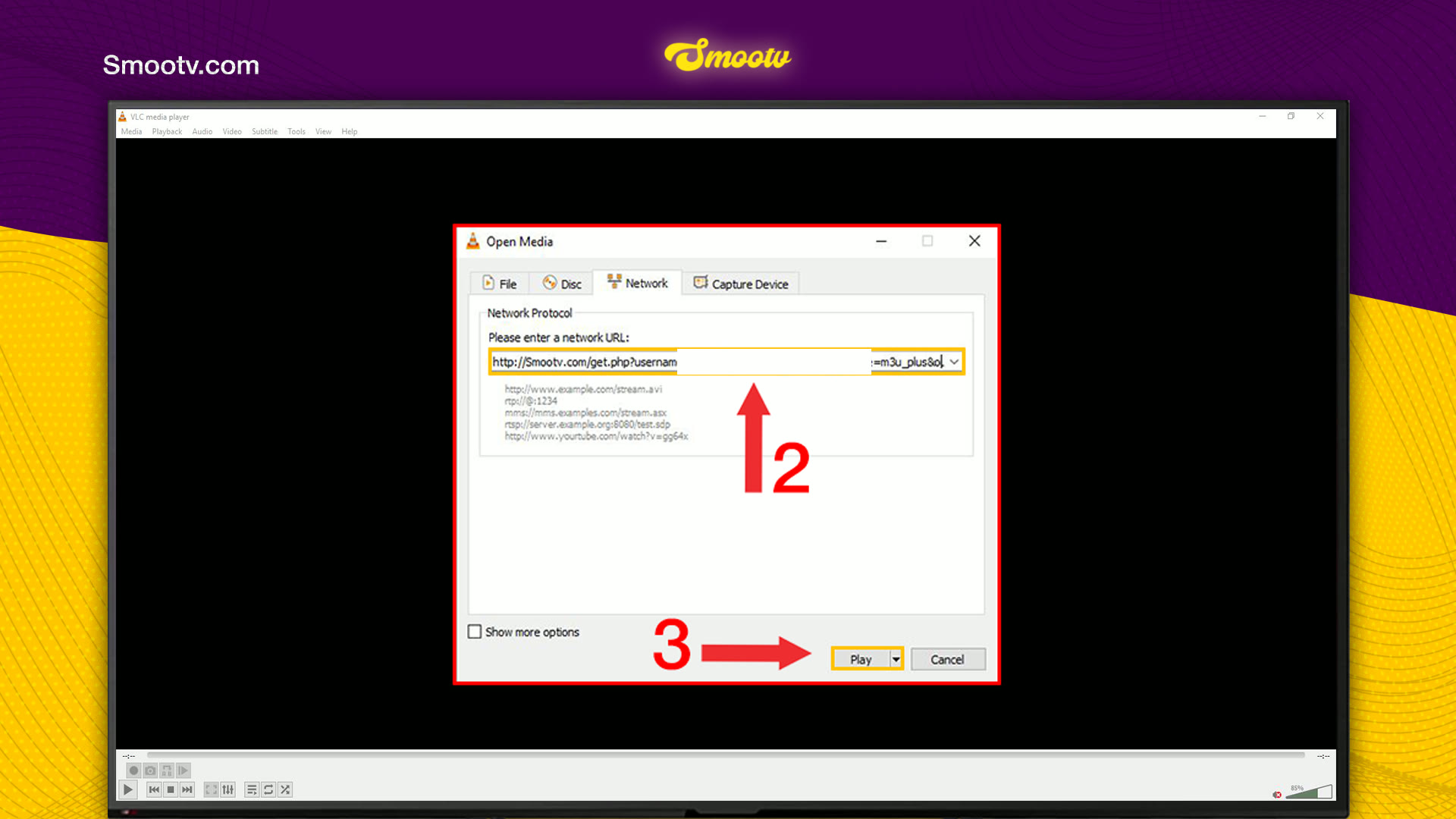
Step 2: Paste Your M3U Link and Click Play
The Open Media window opens on the Network tab. Paste your Smootv M3U link in the field under Please enter a network URL, then click Play.
Did you get an M3U file instead of a link? Then use Media and Open File, and select the file.
No playlist yet?
Ask us for a free 24-hour trial and we will send you one. Request your free trial
Step 3: Open the Playlist and Pick a Channel
VLC starts playing the first channel right away. To see the full list, click View and choose Playlist, or press Ctrl + L. Your channels and groups appear in the playlist.
- Double-click a channel to start watching.
- Press Ctrl + F to search the list by name.
- Press Ctrl + L again to go back to the picture.

That is all. VLC is a quick way to check your subscription on a computer without installing anything else.
If Something Does Not Work
VLC says it cannot open the link
The link is almost always incomplete. Copy it again from our message, from http:// to the very last character, and paste it without a space before or after it. If it still fails, message us and we will check your account.
Only one channel plays and you see no list
That is normal. VLC plays the first entry and hides the rest. Press Ctrl + L to open the playlist.
The list takes a long time to appear
An M3U link holds every channel, film and series in one list, so VLC needs a moment to read it. Wait until the playlist is filled before you start clicking.
The picture buffers or freezes
Use a network cable or 5 GHz Wi-Fi. You need about 25 Mbps for HD and 50 Mbps for 4K. Restarting your router and the app often helps as well.
VLC and IPTV Questions
Can VLC play IPTV?
Yes. VLC opens M3U links and M3U files. Paste the link under Media, Open Network Stream, and VLC loads the channels into its playlist.
Does VLC come with channels?
No. VLC is a media player. The channels, films and series come from your Smootv M3U link.
Where is the channel list in VLC?
Under View, Playlist. The shortcut is Ctrl + L, and the same shortcut takes you back to the picture.
How do I find a channel quickly?
Open the playlist and press Ctrl + F, or type the name in the search box in the top right corner of the playlist.
I only have Xtream Codes details. Can I use them in VLC?
VLC has no login screen for Xtream Codes, it needs an M3U link or file. Message us and we will send you the M3U link that belongs to your account.
Still Stuck?
Message us on WhatsApp or Telegram and we will set it up with you, step by step.


