
On a Formuler Z11 or Z12 (MyTVOnline 3 or 4): open the menu, go to Content Manager, then Content Sources, press Add, choose the portal option and enter the portal URL, username and password from your Smootv message. On an older Formuler (MyTVOnline 2): menu, Connections, Add Portal, same three details. After a few seconds the app shows TV Channels, VOD and TV Series. MyTVOnline needs no activation and no MAC registration for Smootv; the login is enough.
What You Need
- A Formuler box: Z11 Pro, Z11 Pro Max, Z mini and Z12 run MyTVOnline 3 or 4; Z8, Z10, GTV and CC models run MyTVOnline 2. The steps for both are below.
- Your Smootv login details: portal URL, username and password (they are in the message we sent you with your trial or subscription)
- A network cable or 5 GHz Wi-Fi on the box
Good to know
MyTVOnline is Formuler's own player and comes with every Formuler box for life. It has no channels and sells no subscriptions; what you watch comes from the provider you add. Smootv works in every version, with a normal username and password: no MAC address, no activation, no file upload.
Step 1: See which MyTVOnline you have
Open the menu of the app. If you see Content Manager, you have MyTVOnline 3 or 4 (Z11 Pro, Z11 Pro Max, Z mini, Z12; the Z12 Ultra gets version 4 through the official software update). If the menu shows Connections between Schedule and Settings, you have MyTVOnline 2 (Z8, Z10, GTV 4K, CC). Version 3 and 4 users continue with step 2; version 2 users skip to step 3.
Step 2: MyTVOnline 3 and 4: Content Manager, Content Sources, Add
- Menu, Content Manager, Content Sources.
- Press Add (the plus) and choose the portal option with username and password (Formuler calls it XC or Xtream Codes portal).
- Name: anything you like, for example Smootv, without spaces at the end.
- URL: the portal address from your Smootv message, exactly as written, including http:// and the port number.
- Username and password from the same message; they are case sensitive.
- Save and connect. The list, guide and films load within a minute.
Only have an M3U link?
Add it as a playlist under the same Add button. MyTVOnline 3 recognises the link and offers to turn it into a portal; say yes, and you get the same guide and catch-up as with the portal login.
No playlist yet?
Ask us for a free 24-hour trial and we will send you one. Request your free trial
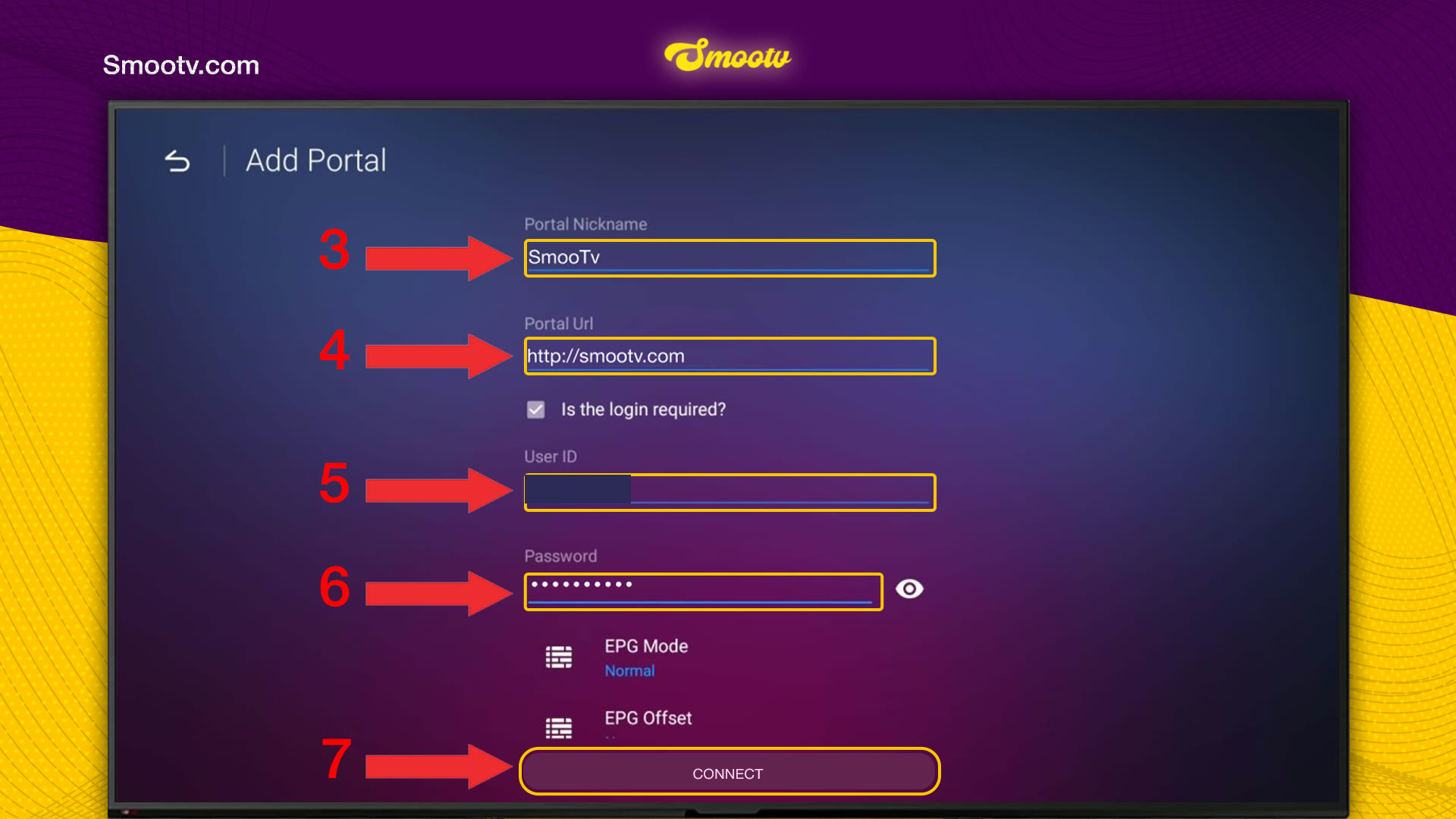
Step 3: MyTVOnline 2: Connections, Add Portal
Start MyTVOnline and open the menu on the left. Below Radio, Refresh, Recordings and Schedule you find Connections. Select it. The Connections screen has two sections, Portals and Playlists; under Portals, press the Add Portal tile. The Portal_Default entry next to it is a sample that ships with the app, and you can ignore it.


- Portal Nickname: type any name you like, for example Smootv.
- Portal Url: type the portal address from your Smootv message. It must start with http:// and usually ends with a port number.
- Leave Is the login required? ticked.
- User ID: type the username we sent you.
- Password: type the password we sent you. The eye icon next to the field shows what you typed.
- Press Connect.
You can leave EPG Mode and EPG Offset as they are. Username and password are case sensitive, so type capital letters as capitals and do not leave a space at the end.
Step 4: Start Watching
Wait a few seconds while the app loads your content. When it is ready, the bar at the top shows TV Channels, TV Program, VOD and TV Series, next to Radio, Recordings and Schedule. Pick one and start watching. The guide (TV Program) and catch-up fill themselves from your Smootv account.

Buying a Formuler or choosing between models? Formuler Z12 Ultra vs Z11 Pro Max: all five boxes compared
That is all. The portal is saved in the app, so you only type these details once; after a renewal nothing changes as long as your username and password stay the same.
If Something Does Not Work
The portal does not connect
Check the URL first. It must start with http:// and match your Smootv message exactly, including the port number. Then check the username and password for typing mistakes and spaces; in MyTVOnline 2 also check that Is the login required? is ticked.
Your provider asked for a MAC address before
That is the other portal type (Stalker), where the provider registers the box's MAC starting with 00:1A. Smootv does not use it: choose the option with username and password, and you can move the login to any other device later.
New channels or films are missing
Open the menu and press Refresh (MyTVOnline 2) or reload the source in Content Sources (MyTVOnline 3). The app loads the content of your portal again.
The picture buffers or freezes
Use a network cable or 5 GHz Wi-Fi. You need about 25 Mbps for HD and 50 Mbps for 4K. Restarting your router and the box often helps as well.
MyTVOnline Questions
What is MyTVOnline, and is there a MyTVOnline subscription?
MyTVOnline is the TV app Formuler builds into its boxes: a player with a guide, catch-up, recording and favourites. Formuler sells no channels or subscriptions, and sites that offer a MyTVOnline subscription are simply IPTV sellers using the app's name. Any provider with a username and password login works in it, including Smootv.
MyTVOnline 2, 3 or 4: what is the difference?
Version 2 (Z8, Z10, GTV, CC) uses the Connections menu. Version 3 (Z11 Pro, Z11 Pro Max, Z mini, Z12 Ultra) moved everything to Content Manager and turns M3U links into portals by itself. Version 4 (Z12 Pro, Z12 Ultra SE, and the Z12 Ultra through the official update) is the newer interface on the same base. Smootv works the same in all three.
Can I use MyTVOnline on my phone or on another TV box?
On phones and tablets, yes: Formuler's MYTVOnline+ app is in Google Play and the App Store and takes the same Smootv login. On other brands of TV box there is no MyTVOnline; use HOT IPTV Player or IBO Player there, with the same login.
Should I add a portal or a playlist?
The portal with username and password. It loads TV Channels, VOD, TV Series, the guide and catch-up in one go. A playlist (M3U) only gives you the channels, unless MyTVOnline 3 converts it for you.
Where do I find my portal URL, username and password?
In the message we sent you when your trial or subscription started. If you cannot find it, message support and we will send the details again.
What is the Portal_Default entry in MyTVOnline 2?
A sample portal that ships with the app. It has nothing to do with Smootv, and your own portal appears next to it after you connect.
Still Stuck?
Message us on WhatsApp or Telegram and we will set it up with you, step by step.


