
Open BOB Player and write down the Device ID and the Device Key shown on the App Instructions screen. On your phone or computer, log in on the BOB Player website with those two codes, press Add Playlist, give the playlist a name, paste your Smootv M3U link and press Save. Reload or restart the app and Live TV, Movies and Series fill up. BOB Player gives you a 7-day trial of the player itself.
Activate BOB Player through Smootv
BOB Player is free for 7 days. After that the app needs a one-time activation per device; we arrange it for you for €10, valid for the lifetime of your device, and with a 12-month subscription the activation is free. No website, no file upload: send us the code the app shows and we do the rest.
What You Need
- The BOB Player app installed on your TV or device
- Your Smootv M3U link (it is in the message we sent you with your trial or subscription)
- A phone or computer to open the BOB Player website
Good to know
BOB Player is only a player. The app tells you on its first screen that the 7 trial days are for testing it with your own playlist. Channels, films and series come from your Smootv subscription, and the makers of BOB Player are a separate company.
Step 1: Note Your Device ID and Device Key
Open BOB Player. The App Instructions screen appears with two codes: the Device ID, six pairs of characters separated by colons, and a shorter Device Key. Write both down or take a photo, then press OK.
You can find the same codes later under Settings, in Account Info.

Step 2: Log In on the BOB Player Website
On your phone or computer, open the Manage Playlist page: api.bobplayer.com/login
- In Mac Address, type the Device ID from the app, colons included. The website uses a different name for the same code.
- In Device Key, type the key from the app.
- Type the captcha characters in the field below the picture.
- Press Login.

Step 3: Add Your Smootv Playlist
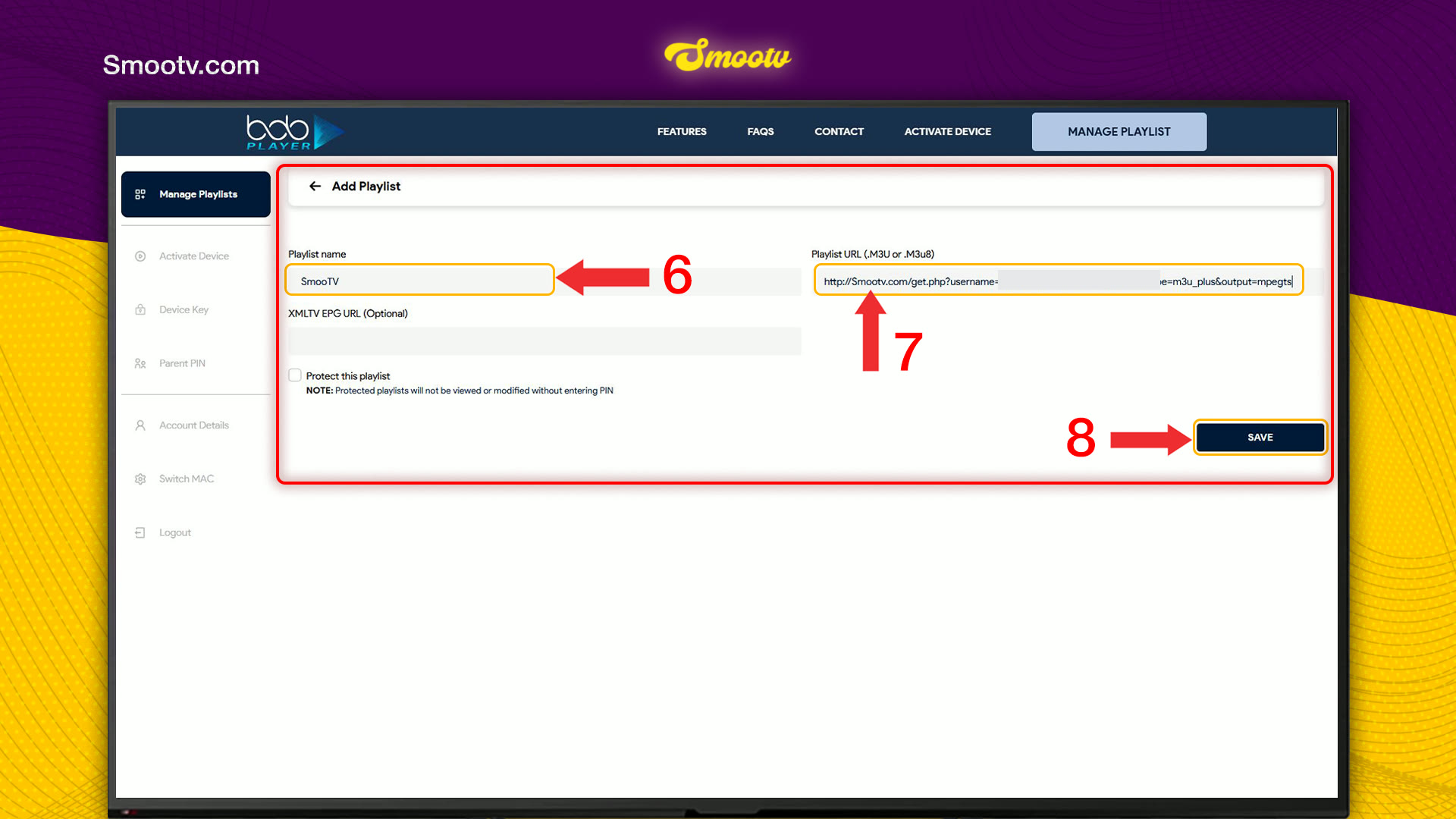
After logging in you land on Manage Playlists. A new device shows No Playlists to show. Press Add Playlist in the top right corner.

- In Playlist name, type a name. Anything works, for example Smootv.
- In Playlist URL, paste your Smootv M3U link.
- Leave XMLTV EPG URL empty. It is optional.
- Press Save.
If you tick Protect this playlist, the playlist can only be opened or changed after entering a PIN. Skip it unless you want that lock.
No playlist yet?
Ask us for a free 24-hour trial and we will send you one. Request your free trial
Step 4: Reload the App and Start Watching
Go back to your TV and reload BOB Player, or close it and open it again. Wait a few seconds while the playlist loads. The home screen then shows Live TV, Movies and Series, next to Settings.
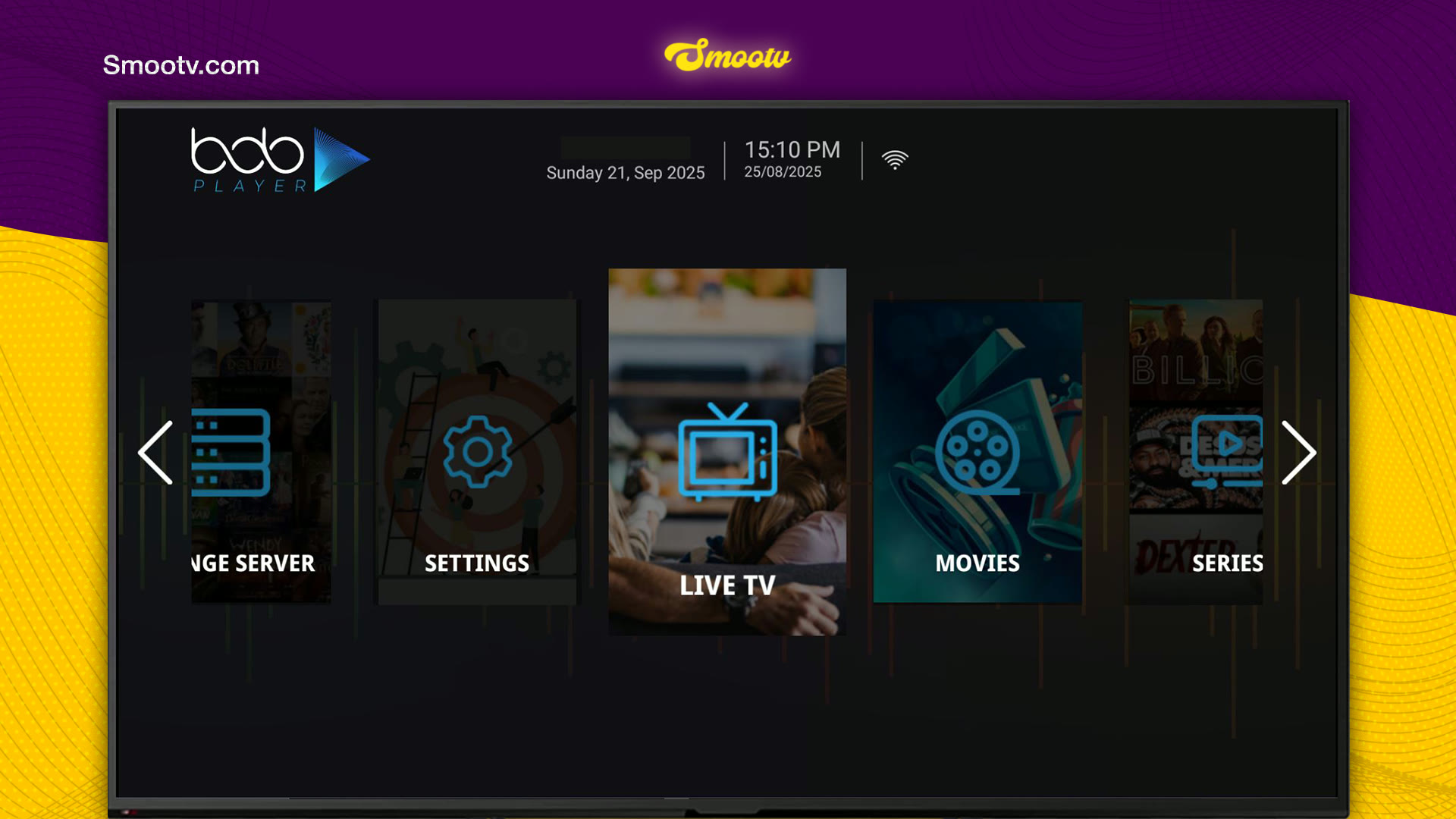
That is all. The playlist is saved on the BOB Player website for this device, so you only do this once.
If Something Does Not Work
The website does not accept your login
Type the Device ID with its colons in the Mac Address field, and check the Device Key digit by digit. If the captcha is hard to read, press Refresh Captcha for a new one.
The app stays empty after you saved the playlist
Restart the app first. If it is still empty, log in on the website again and check that the playlist is listed and that the M3U link was pasted in full, without a space at the start or the end.
You closed the first screen before noting the codes
Open Settings on the home screen and choose Account Info. The Device ID and the Device Key are listed there.
The picture buffers or freezes
Use a network cable or 5 GHz Wi-Fi. You need about 25 Mbps for HD and 50 Mbps for 4K. Restarting your router and the app often helps as well.
How to activate BOB Player: read our guide
BOB Player Questions
Is BOB Player free?
The app starts with a 7-day trial. To keep using it after that, you extend the expiry date under Activate Device on the BOB Player website. BOB Player sets the price for that, not Smootv.
Does BOB Player come with channels?
No. It is a media player that you test and use with your own playlist. Channels, films and series come from your Smootv M3U link.
The app says Device ID but the website asks for a Mac Address. Which one do I use?
They are the same code. Type the Device ID from the app into the Mac Address field, with the colons.
Can I protect my playlist with a PIN?
Yes. Tick Protect this playlist when you add it. A protected playlist cannot be viewed or changed without the PIN, which you manage under Parent PIN on the website.
Do I have to add the playlist again when I renew Smootv?
No, as long as your M3U link stays the same. If we send you a new link, log in on the BOB Player website and replace the old one.
Still Stuck?
Message us on WhatsApp or Telegram and we will set it up with you, step by step.


